[PHP] 성적처리 프로그램 작성
[PHP] 성적처리 프로그램 작성
stud_score.sql
- auto_increment: 자동 증가
- float: 평균값에 해당하는 필드 svg의 자료형은 float (실수)로 설정한다.
1
2
3
4
5
6
7
8
9
10
11
12
create table stud_score (
	num int not null auto_increment,
	name varchar(12),
	sub1 int,
	sub2 int,
	sub3 int,
	sub4 int,
	sub5 int,
    sum int,
    avg float,
	primary key(num)
);
stud.score.php
- php에서 mysql 테이블 생성을 할 수 있다.
- 실행하면 테이블이 생성 됨
1
2
3
4
5
6
7
8
9
10
11
12
13
14
15
16
17
18
19
20
21
22
23
24
25
26
<meta charset="UTF-8">
<?
  $connect = mysql_connect("localhost","song","1234");
  $dbconn = mysql_select_db("song_db", $connect);    //DB접속

  $sql = "create table stud_score ( ";
  $sql .= "num int not null auto_increment, ";
  $sql .= "name varchar(12), ";
  $sql .= "sub1 int, ";
  $sql .= "sub2 int, ";
  $sql .= "sub3 int, ";
  $sql .= "sub4 int, ";
  $sql .= "sub5 int, ";
  $sql .= "sum int, ";
  $sql .= "avg float, ";
  $sql .= "primary key(num) )";

  $result = mysql_query($sql, $connect);

  if ($result)
    echo "데이터베이스 테이블 'stud_score'가 생성되었습니다!";
  else
    echo "데이터베이스 테이블 생성 에러!!!";

  mysql_close();
?>
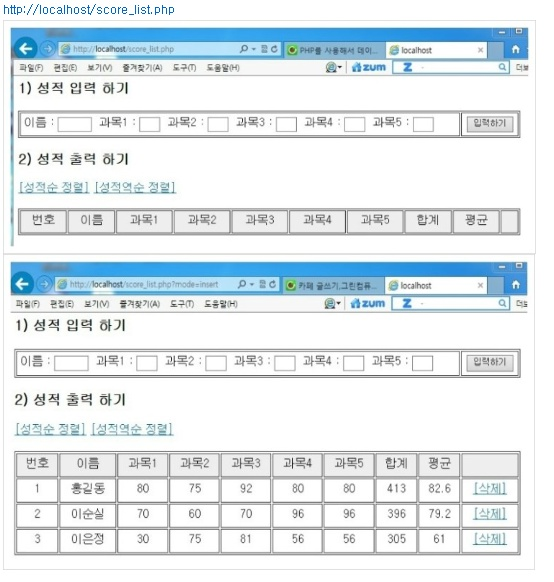
score.list.php
목록페이지. mysql에 등록된 리스트를 출력한다.
- 정렬에 따른 $sql문을 if문으로 설정한다.
- round(숫자, 소수점자리 수)
- 실수의 소수점 반올림(소수 1째자리까지 반올림)하여 반환한다
- round(숫자, 소수점자리 수)
1
2
3
4
5
6
7
8
9
10
11
12
13
14
15
16
17
18
19
20
21
22
23
24
25
26
27
28
29
30
31
32
33
34
35
36
37
38
39
40
41
42
43
44
45
46
47
48
49
50
51
52
53
54
55
56
57
58
59
60
61
62
63
64
65
66
67
68
69
70
71
72
73
74
75
76
77
78
79
80
81
82
83
84
85
86
87
88
89
90
91
92
93
94
95
96
97
98
99
100
101
102
103
104
105
106
107
108
109
110
111
112
113
114
115
116
117
118
119
120
121
122
123
<!DOCTYPE html>
<html lang="ko">
<head>
<meta charset="UTF-8">
<meta http-equiv="X-UA-Compatible" content="IE=edge">
<meta name="viewport" content="width=device-width, initial-scale=1.0">
<title>성적처리 프로그램 작성</title>
<style>
.wrap{width:1000px;}
h3{margin:50px 0 10px;}
p{text-align:right;}
.input_form{border:1px solid #ccc; padding:15px 20px; overflow:hidden;}
.input_form input{padding:5px 3px;}
.input_form input[type="text"]{margin-right:15px;}
.input_form input[type="submit"]{float:right; background:#444; color:#fff; border:1px solid #444; padding:5px 10px; border-radius:3px;}
table{width:100%; border-collapse:collapse;}
table td{border:1px solid #ccc; padding:5px;}
table thead{background:#eee; text-align:center;}
table tbody{text-align:center;}
</style>
</head>
<body>
<div class="wrap">
<h3>1. 성적 입력 하기</h3>
<div class="input_form">
<form action="ins.php?mode=insert" method='post'>
이름 : <input type="text" size="7" name="name">
과목1 : <input type="text" size="3" name="sub1">
과목2 : <input type="text" size="3" name="sub2">
과목3 : <input type="text" size="3" name="sub3">
과목4 : <input type="text" size="3" name="sub4">
과목5 : <input type="text" size="3" name="sub5">
<input type="submit" value="입력하기">
</form>
</div>
<h3>2. 성적 출력 하기</h3>
<p>
<a href ="score_list.php?mode=big_first">[성적순 정렬]</a>
<a href ="score_list.php?mode=small_first">[성적역순 정렬]</a>
<a href ="score_list.php?mode=top3">[TOP3]</a>
</p>
<table>
<thead>
<tr>
<td>번호</td>
<td>이름</td>
<td>과목1</td>
<td>과목2</td>
<td>과목3</td>
<td>과목4</td>
<td>과목5</td>
<td>합계</td>
<td>평균</td>
<td>삭제</td>
</tr>
</thead>
<tbody>
<?
@extract($_POST);
@extract($_GET);
$connect = mysql_connect("localhost","song","1234"); // DB 연결
mysql_select_db("song_db", $connect); // DB 선택
// select 문 수행
if ($mode == "big_first"){ // 성적순 정렬(내림차순)
$sql = "select * from stud_score order by sum desc";
}else if ($mode == "small_first"){ // 성적순 정렬(오름차순)
$sql = "select * from stud_score order by sum";
}else if ($mode == "top3"){ // 성적순 정렬(오름차순)
$sql = "select * from stud_score order by sum desc limit 3";
}else{
$sql = "select * from stud_score"; //입력된 순서대로 ..
}
$result = mysql_query($sql); // sql명령 처리
$count = 1; // 화면 출력 시 일렬번호
// DB 데이터 출력 시작
while ($row = mysql_fetch_array($result)){ // 검색된 레코드를 읽어와라.
$avg = round($row[avg], 1);
// 실수의 소수점 반올림(소수 1째자리까지 반올림)
$num = $row[num]; // 1, 실제 DB에 있는 번호. 프라이머리 키. 삭제 시 필요
echo "
<tr>
<td> $count </td>
<td> $row[name] </td>
<td> $row[sub1] </td>
<td> $row[sub2] </td>
<td> $row[sub3] </td>
<td> $row[sub4] </td>
<td> $row[sub5] </td>
<td> $row[sum] </td>
<td> $avg </td>
<td>
<a href='score_delete.php?num=$num'>[삭제]</a>
</td>
</tr>
";
$count++;
}
// DB 데이터 출력 끝
mysql_close(); // DB 접속 끊기
?>
</tbody>
</table>
</div>
</body>
</html>
ins.php
score_list.php (목록페이지)로부터 전달받은 데이터를 mysql에 등록한 후, 다시 목록페이지로 돌아간다.
- $mode = insert (get) // 지금 기능에서는 없어도 됨
- $name = 입력된 이름 (post)
- $sub1 ~ $sub5 = 입력된 과목별 점수 (post)
1
2
3
4
5
6
7
8
9
10
11
12
13
14
15
16
17
18
19
20
21
22
23
24
25
26
27
28
29
<?
  @extract($_POST);
  @extract($_GET);

  /*
    $mode = insert (get)     // 지금 기능에서는 없어도 됨
    $name = 입력된 이름 (post)
    $sub1 ~ $sub5 = 입력된 과목별 점수 (post)
  */

  $connect = mysql_connect("localhost","song","1234"); // DB 연결
  mysql_select_db("song_db", $connect);                // DB 선택

  if ($mode == "insert"){ // 데이터 입력 모드, 지금 기능에서는 없어도 됨

    $sum = $sub1 + $sub2 + $sub3 + $sub4 + $sub5;   // 합계 구하기
    $avg = $sum/5;                                  // 평균 구하기

    $sql = "insert into stud_score (name, sub1, sub2, sub3, sub4, sub5, sum, avg) values";
    $sql .= "('$name', $sub1, $sub2, $sub3, $sub4, $sub5, $sum, $avg)";
    // name은 문자라서 '' 따옴표 사용!

    $result = mysql_query($sql, $connect);
  }
  mysql_close($connect);

  // 다시 score_list.php 로 돌아감, php함수.
  Header("Location:score_list.php");
?>
score_delete.php
score_list.php (목록페이지)에서 num(프라이머리키)를 전달받아 sql에서 해당 레코드를 삭제한 후, 다시 목록페이지로 돌아간다.
1
2
3
4
5
6
7
8
9
10
11
12
13
14
15
16
17
<?
  @extract($_POST);
  @extract($_GET);
  // $num=$_GET["num"];

  $connect = mysql_connect("localhost","song","1234");
  mysql_select_db("song_db", $connect);   // DB연결

  // 필드 num이 $num 값을 가지는 레코드 삭제
  $sql = "delete from stud_score where num = $num";
  mysql_query($sql, $connect);

  mysql_close($connect);

  // score_list.php 로 돌아감
  Header("Location:score_list.php");
?>
This post is licensed under CC BY 4.0 by the author.